Diamonds - Part 2 - A cut above - Building Linear Models
Other posts in this series:
- Diamonds - Part 1 - In the rough - An Exploratory Data Analysis
- Diamonds - Part 3 - A polished gem - Building Non-linear Models
In a previous post in this series, we explored the diamonds dataset. We found that price has a strong correlation with carat, x, y and z, and that log(price) has an almost straight-line relationship with log(carat). For diamonds of similar weight, clarity and color also seemed to help predict the price.
In this post, we build linear models and find out how well they predict the price of diamonds. A linear model predicts a value by adding up the features, each multiplied by a number (a coefficient) that the model learns from the data.
First, let’s build a simple base model that uses all the features, without any changes to them. Its results give us a starting point to compare with:
model_lm <- lm(price ~ ., data = diamonds)
summary(model_lm)
Call:
lm(formula = price ~ ., data = diamonds)

Residuals:
   Min     1Q Median     3Q    Max
-21376   -592   -183    376  10694

Coefficients:
            Estimate Std. Error t value             Pr(>|t|)
(Intercept)  5753.76     396.63   14.51 < 0.0000000000000002 ***
carat       11256.98      48.63  231.49 < 0.0000000000000002 ***
cut.L         584.46      22.48   26.00 < 0.0000000000000002 ***
cut.Q        -301.91      17.99  -16.78 < 0.0000000000000002 ***
cut.C         148.03      15.48    9.56 < 0.0000000000000002 ***
cut^4         -20.79      12.38   -1.68               0.0929 .
color.L     -1952.16      17.34 -112.57 < 0.0000000000000002 ***
color.Q      -672.05      15.78  -42.60 < 0.0000000000000002 ***
color.C      -165.28      14.72  -11.22 < 0.0000000000000002 ***
color^4        38.20      13.53    2.82               0.0047 **
color^5       -95.79      12.78   -7.50    0.000000000000066 ***
color^6       -48.47      11.61   -4.17    0.000030090737193 ***
clarity.L    4097.43      30.26  135.41 < 0.0000000000000002 ***
clarity.Q   -1925.00      28.23  -68.20 < 0.0000000000000002 ***
clarity.C     982.20      24.15   40.67 < 0.0000000000000002 ***
clarity^4    -364.92      19.29  -18.92 < 0.0000000000000002 ***
clarity^5     233.56      15.75   14.83 < 0.0000000000000002 ***
clarity^6       6.88      13.72    0.50               0.6157
clarity^7      90.64      12.10    7.49    0.000000000000071 ***
depth         -63.81       4.53  -14.07 < 0.0000000000000002 ***
table         -26.47       2.91   -9.09 < 0.0000000000000002 ***
x           -1008.26      32.90  -30.65 < 0.0000000000000002 ***
y               9.61      19.33    0.50               0.6192
z             -50.12      33.49   -1.50               0.1345
---
Signif. codes:  0 '***' 0.001 '**' 0.01 '*' 0.05 '.' 0.1 ' ' 1

Residual standard error: 1130 on 53916 degrees of freedom
Multiple R-squared:  0.92,	Adjusted R-squared:  0.92
F-statistic: 2.69e+04 on 23 and 53916 DF,  p-value: <0.0000000000000002
diamonds %>%
mutate(estimate = predict(model_lm, diamonds)) %>%
metrics(truth = price, estimate = estimate)# A tibble: 3 × 3
.metric .estimator .estimate
<chr> <chr> <dbl>
1 rmse standard 1130.
2 rsq standard 0.920
3 mae standard 740. The model summary shows that this model is overfitted. An overfitted model learns the noise in the data, not only the true patterns, so it does not work well on new data. For example, we know that depth and table have no effect on price, but the model says that they are very important.
The table above also shows the root mean squared error (RMSE) and other metrics. RMSE is the typical size of a prediction error, in the same units as the price. A lower RMSE means better predictions.
Let’s plot the predicted prices against the actual prices, to see how well this base model works.
augment(model_lm, diamonds) %>%
  eda_plot_predicted_vs_actual("price", ".fitted", nLabel = 0, labelsScale = scales::label_dollar(accuracy = 1)) +
  labs(title = "Predicted v/s actual price from a base linear model")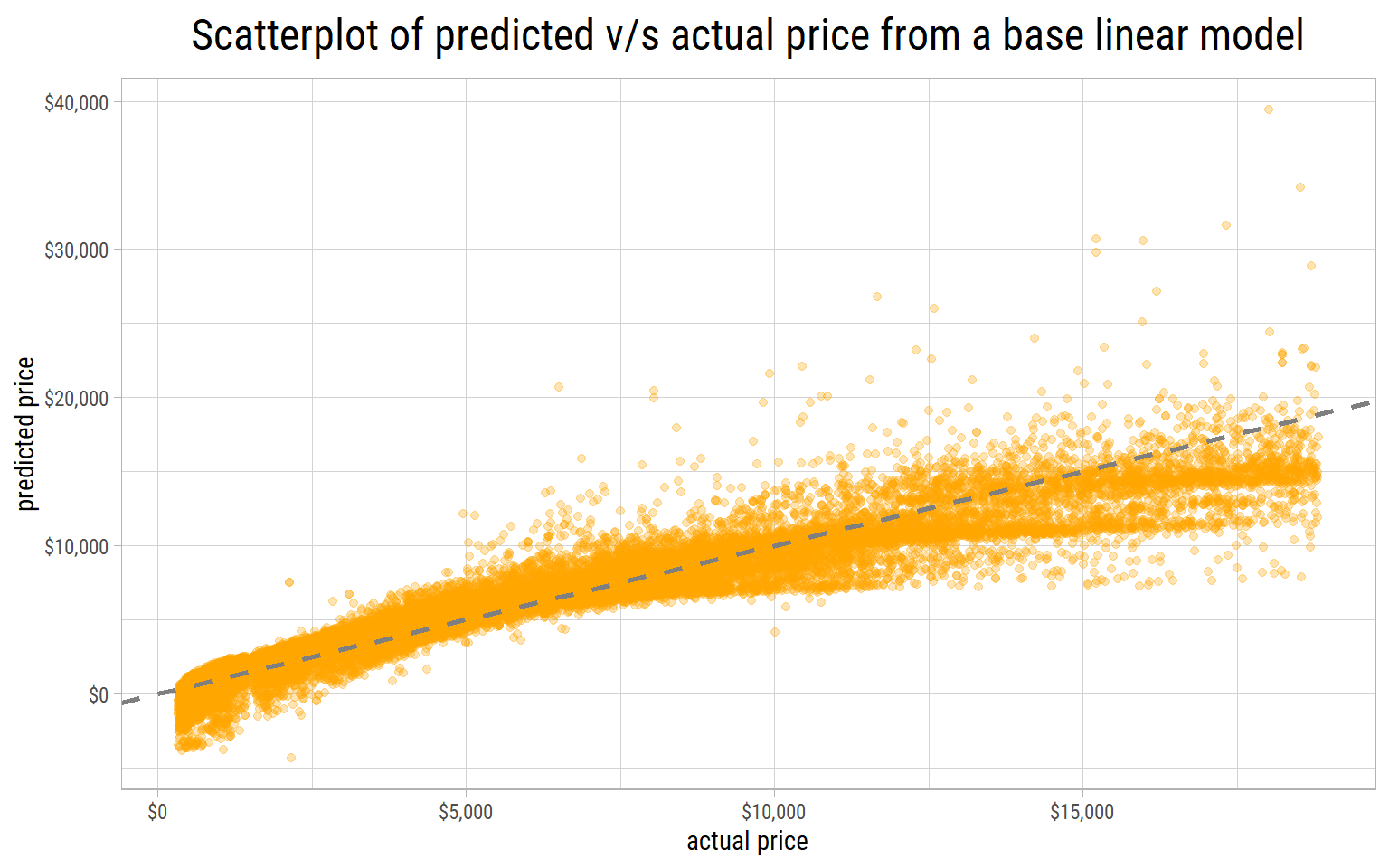
If the predictions are good, the points are close to the red line at 45 degrees, where the predicted price is equal to the actual price. A point above the line is a diamond whose predicted price is too high, and a point below the line is a diamond whose predicted price is too low. This base model predicts the prices badly. Worst of all, it predicts negative prices for cheap diamonds. To prevent such impossible results, we must use log(price) instead of price.
Feature Engineering
Feature engineering means that we create new features from the existing features, to make the patterns easier for a model to learn.
We know that the price of a diamond has a strong correlation with its size. If all other things are equal, a larger diamond has a higher price.
As a first estimate, we can treat a diamond as a box with the dimensions x, y and z. Then its volume is x * y * z.
These 3 dimensions have a strong correlation with each other. So we can calculate one average dimension as the cube root of volume. This average dimension keeps a straight-line relationship with log(price).
We can also calculate an average dimension with high school chemistry. Mass, volume and density are related by this equation:
\[density = \frac{mass}{volume}\]
1 carat is 0.2 grams. If we divide the mass by the density of diamond (3.51 grams per cubic centimeter), we get the volume. The cube root of the volume gives an average dimension.
dfInput <- diamonds %>%
  mutate(row = row_number(),
         volume = x*y*z,
         `average dimension` = volume ^ (1/3),
         volume2 = carat * 0.2/3.51,
         `average dimension2` = (volume2 ^ (1/3)) * 10)   # Multiply by 10 to convert from cm to mm

eda_plot_scatter(dfInput, c("average dimension", "average dimension2"), "price", yLabelsScale = scales::dollar,
                 nLabel = 3, feature_id = "row", labelBy = "leverage") +
  labs(title = "Scatterplot of price v/s average dimension")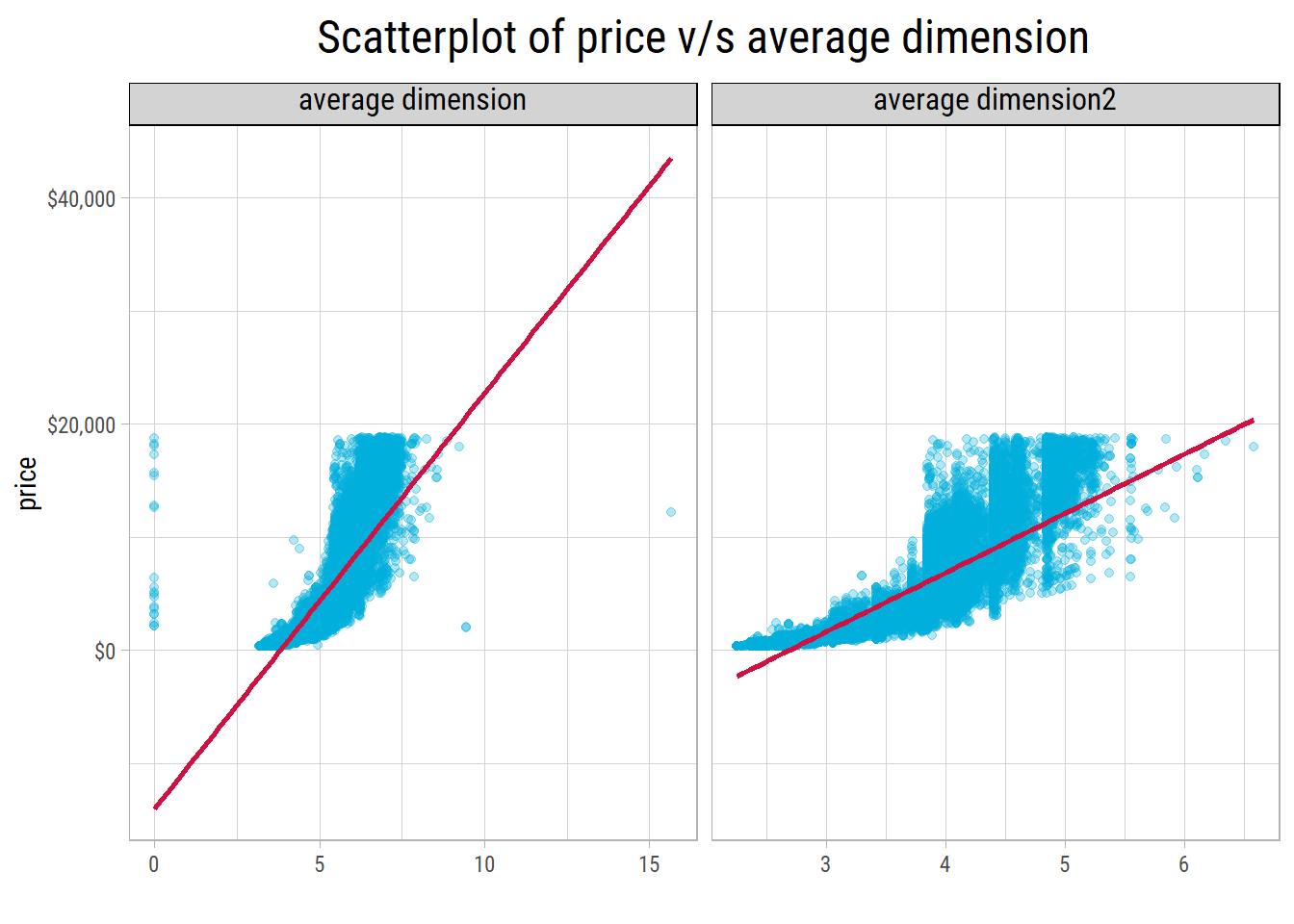
# the point with the most leverage on the linear fit of price on the dimension-based feature
dfLeverage <- dfInput %>%
  mutate(leverage = hatvalues(lm(price ~ `average dimension`, data = dfInput))) %>%
  slice_max(leverage, n = 1)
The two methods give similar results, but the density method gives a narrower range. Which method is more reliable?
In each panel, the labels show the row numbers of the diamonds with the most leverage. Leverage tells how much a point can pull the straight line towards itself. Points that are far from the others along the x axis have the most leverage.
With the dimensions, the most extreme point is the diamond in row 24068. It is a 2 carat diamond with a recorded width y of 58.9 mm. This value is clearly a recording error. The other labelled points are diamonds with an average dimension of 0. With the density method, the labelled points are simply the largest diamonds in the dataset.
Also, 20 values of z are 0. In 7 of these diamonds, x and y are also 0. So these dimensions were not recorded correctly.
diamonds %>% dplyr::filter(x == 0 | y == 0 | z == 0)# A tibble: 20 × 10
carat cut color clarity depth table price x y z
<dbl> <ord> <ord> <ord> <dbl> <dbl> <int> <dbl> <dbl> <dbl>
1 1 Premium G SI2 59.1 59 3142 6.55 6.48 0
2 1.01 Premium H I1 58.1 59 3167 6.66 6.6 0
3 1.1 Premium G SI2 63 59 3696 6.5 6.47 0
4 1.01 Premium F SI2 59.2 58 3837 6.5 6.47 0
5 1.5 Good G I1 64 61 4731 7.15 7.04 0
6 1.07 Ideal F SI2 61.6 56 4954 0 6.62 0
7 1 Very Good H VS2 63.3 53 5139 0 0 0
8 1.15 Ideal G VS2 59.2 56 5564 6.88 6.83 0
9 1.14 Fair G VS1 57.5 67 6381 0 0 0
10 2.18 Premium H SI2 59.4 61 12631 8.49 8.45 0
11 1.56 Ideal G VS2 62.2 54 12800 0 0 0
12 2.25 Premium I SI1 61.3 58 15397 8.52 8.42 0
13 1.2 Premium D VVS1 62.1 59 15686 0 0 0
14 2.2 Premium H SI1 61.2 59 17265 8.42 8.37 0
15 2.25 Premium H SI2 62.8 59 18034 0 0 0
16 2.02 Premium H VS2 62.7 53 18207 8.02 7.95 0
17 2.8 Good G SI2 63.8 58 18788 8.9 8.85 0
18 0.71 Good F SI2 64.1 60 2130 0 0 0
19 0.71 Good F SI2 64.1 60 2130 0 0 0
20 1.12 Premium G I1 60.4 59 2383 6.71 6.67 0For all of these diamonds, the carat values are correct. So carat is probably more accurate than the dimensions,
and we prefer the density method to create this feature.
Also, the density is a constant. So we do not need to divide by it to calculate the volume. Instead, we can take the cube root of carat itself. Then we expect a straight-line relationship between \(log(price)\) and \(carat^{1/3}\).
A straight-line relationship is what a linear model needs, because the model adds up its features in a straight-line way.
The geometry suggests a cube root. But does the cube root give the best straight line? Let’s compare it with other transforms. Each panel shows the R-squared of a straight line through the points of log(price):
p_transforms <- eda_plot_transforms(diamonds, "carat", "price")
p_transforms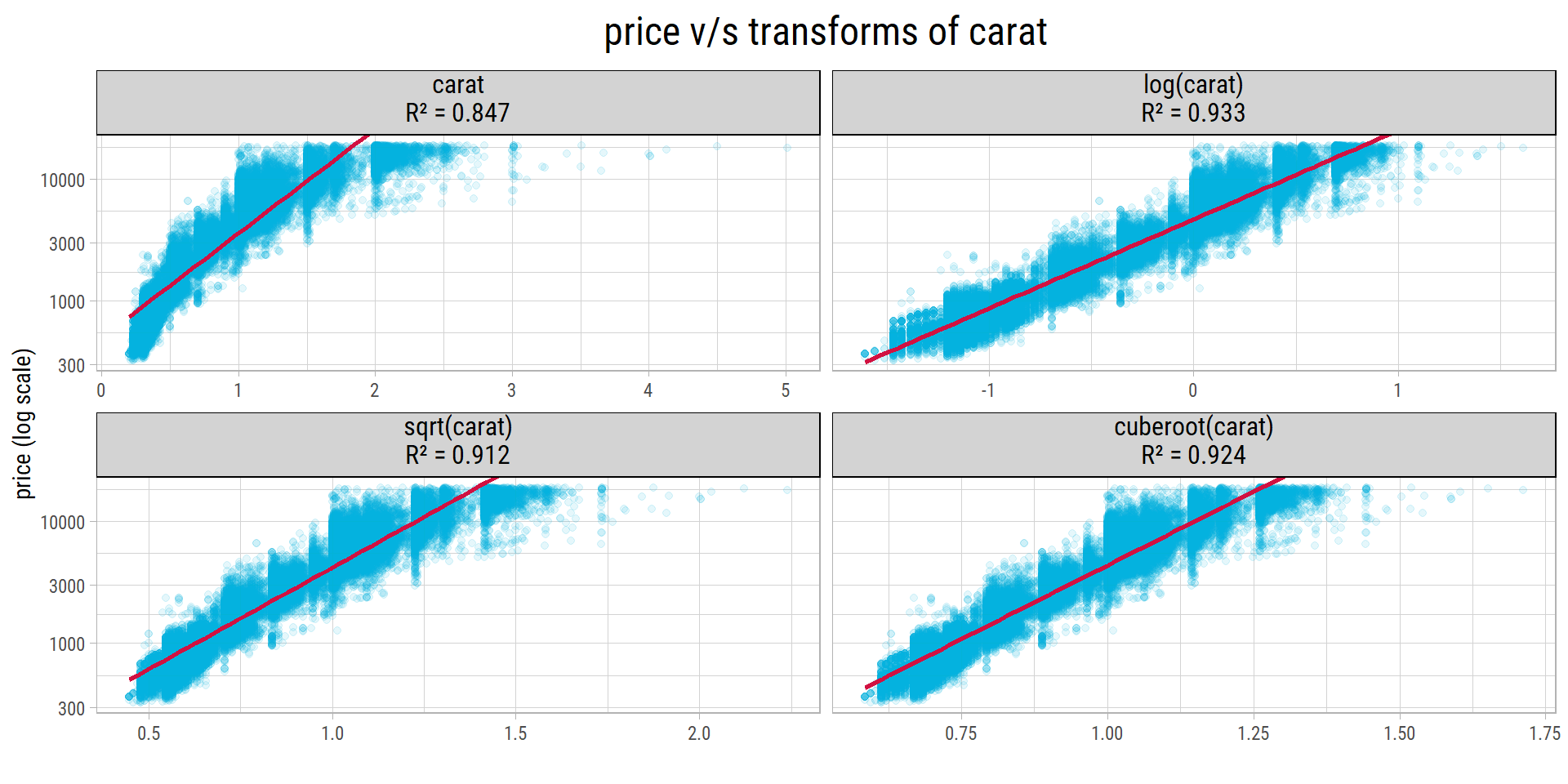
# R-squared of each transform, in the order of the panels
vR2_carat <- p_transforms$data %>%
  distinct(transform, r_squared) %>%
  pull(r_squared) %>%
  set_names(c("identity", "log", "sqrt", "cuberoot"))
The cube root (R-squared 0.924) is much better than carat without a transform (0.847). But log(carat) is even better (0.933). A straight-line relationship between \(log(price)\) and \(log(carat)\) is easy to understand: the coefficient of \(log(carat)\) is the percentage change in price when carat increases by 1%. We will try both transforms in our models.
Training Linear Models
These are the steps to build the linear models and measure how well they work:
- Split the dataset into two sets: a training set with 75% of the diamonds and a testing set with 25%. The model learns from the training set. Then we check its predictions on the testing set, which has diamonds that the model has not seen.
clarityis one of the most important features. So we split the data in a way that keeps the same mix ofclaritygrades in both sets. This is called stratified sampling.- Train (fit) a linear model on the training set.
- Make predictions on the testing set and calculate the metrics.
- Put all the steps above in a function that takes the model formula and a random seed. The seed controls which diamonds go into each set. With different seeds, we get different random splits, so one lucky or unlucky split does not decide the results.
- Run each model several times with different seeds, and calculate its average metrics. These averages show how well the model works on new data.
Here is one split into a training set and a testing set, stratified by clarity. Both sets have a similar mix of clarity grades.
set.seed(1333)
train_split <- diamonds %>%
  select(price, everything()) %>%
  initial_split(prop = 0.75, strata = "clarity")

dfTrain <- training(train_split)
dfTest <- testing(train_split)

Hmisc::describe(dfTrain$clarity)
dfTrain$clarity
n missing distinct
40453 0 8
Value I1 SI2 SI1 VS2 VS1 VVS2 VVS1 IF
Frequency 557 6904 9810 9197 6109 3785 2766 1325
Proportion 0.014 0.171 0.243 0.227 0.151 0.094 0.068 0.033Hmisc::describe(dfTest$clarity)dfTest$clarity
n missing distinct
13487 0 8
Value I1 SI2 SI1 VS2 VS1 VVS2 VVS1 IF
Frequency 184 2290 3255 3061 2062 1281 889 465
Proportion 0.014 0.170 0.241 0.227 0.153 0.095 0.066 0.034We ran each model 5 times with different seeds. Here are the average metrics. R-squared (rsq) tells how much of the variation in price the model explains, and the mean absolute error (mae) is the average size of a prediction error:
fit_linear_model <- function(randomSeed, model_formula, get_model = FALSE) {

  set.seed(randomSeed)
  train_split <- diamonds %>%
    select(price, everything()) %>%
    initial_split(prop = 0.75, strata = "clarity")

  dfTrain <- training(train_split)
  dfTest <- testing(train_split)

  # fit a linear model
  model_lm <- lm(model_formula, data = dfTrain)

  # predict on testing set to determine rmse
  predict_lm <- predict(model_lm, dfTest)

  # predict on testing set with outliers
  dfResults <- dfTest %>%
    mutate(actual = price) %>%
    mutate(estimate = predict_lm %>% exp()) %>%
    select(actual, estimate)

  if(get_model) {
    return(list(model_lm, dfResults))
  } else {
    return(dfResults)
  }
}
set.seed(1000)
vRandomSeeds <- sample(9999, 5)
dfModels <- expand_grid(seed = vRandomSeeds,
model = c("log(price) ~ .",
"log(price) ~ I(carat^(1/3))",
"log(price) ~ I(carat^(1/3)) + clarity",
"log(price) ~ I(carat^(1/3)) + clarity + color",
"log(price) ~ I(carat^(1/3)) + clarity + color + cut",
"log(price) ~ log(carat)",
"log(price) ~ log(carat) + clarity",
"log(price) ~ log(carat) + clarity + color",
"log(price) ~ log(carat) + clarity + color + cut")) %>%
mutate(results = map2(seed, model, ~ fit_linear_model(.x, as.formula(.y)))) %>%
mutate(metrics = map(results, ~ metrics(.x, truth = actual, estimate = estimate))) %>%
select(-results) %>%
unnest(cols = metrics) %>%
select(-.estimator) %>%
spread(.metric, .estimate) %>%
group_by(model) %>%
summarise_at(vars(rmse, rsq, mae), mean)
dfModels# A tibble: 9 × 4
model rmse rsq mae
<chr> <dbl> <dbl> <dbl>
1 log(price) ~ . 12085. 0.756 559.
2 log(price) ~ I(carat^(1/3)) 2525. 0.741 1023.
3 log(price) ~ I(carat^(1/3)) + clarity 2173. 0.827 871.
4 log(price) ~ I(carat^(1/3)) + clarity + color 1725. 0.888 624.
5 log(price) ~ I(carat^(1/3)) + clarity + color + cut 1718. 0.891 618.
6 log(price) ~ log(carat) 1624. 0.839 840.
7 log(price) ~ log(carat) + clarity 1225. 0.910 637.
8 log(price) ~ log(carat) + clarity + color 816. 0.959 418.
9 log(price) ~ log(carat) + clarity + color + cut 795. 0.961 402.# average metric of a model
model_metric <- function(model_formula, metric) dfModels[[metric]][dfModels$model == model_formula]The first model, with all the features, is overfitted.
Each model with log(carat) is much better than the same model with the cube root of carat. With clarity and color, the RMSE goes down from $1,725 to $816, and the R-squared goes up from 0.888 to 0.959.
The model with log(carat), clarity and color gives the best combination of a low RMSE and a high R-squared, so it explains the most variation.
This is our final model.
If we add cut, the RMSE goes down only a little, to $795. So we do not use cut, and we keep the model simpler.
Here is the summary of our final model:
formula_string <- "log(price) ~ log(carat) + clarity + color"
fit_lm <- fit_linear_model(1333, as.formula(formula_string), get_model = T)

# the cube root model on the same split, for comparison
fit_lm_cuberoot <- fit_linear_model(1333, as.formula("log(price) ~ I(carat^(1/3)) + clarity + color"), get_model = T)

summary(fit_lm[[1]])
Call:
lm(formula = model_formula, data = dfTrain)

Residuals:
    Min      1Q  Median      3Q     Max
-0.9796 -0.0898 -0.0003  0.0876  1.4300

Coefficients:
            Estimate Std. Error t value             Pr(>|t|)
(Intercept)  8.48644    0.00122 6935.93 < 0.0000000000000002 ***
log(carat)   1.87823    0.00134 1403.69 < 0.0000000000000002 ***
clarity.L    0.95166    0.00420  226.70 < 0.0000000000000002 ***
clarity.Q   -0.26263    0.00393  -66.75 < 0.0000000000000002 ***
clarity.C    0.14657    0.00338   43.37 < 0.0000000000000002 ***
clarity^4   -0.07520    0.00271  -27.78 < 0.0000000000000002 ***
clarity^5    0.03126    0.00222   14.11 < 0.0000000000000002 ***
clarity^6   -0.00520    0.00193   -2.69               0.0071 **
clarity^7    0.03623    0.00171   21.22 < 0.0000000000000002 ***
color.L     -0.43986    0.00242 -181.61 < 0.0000000000000002 ***
color.Q     -0.09854    0.00222  -44.32 < 0.0000000000000002 ***
color.C     -0.01673    0.00208   -8.05  0.00000000000000086 ***
color^4      0.01116    0.00191    5.85  0.00000000508834206 ***
color^5     -0.00155    0.00180   -0.86               0.3884
color^6      0.00175    0.00164    1.07               0.2869
---
Signif. codes:  0 '***' 0.001 '**' 0.01 '*' 0.05 '.' 0.1 ' ' 1

Residual standard error: 0.138 on 40438 degrees of freedom
Multiple R-squared:  0.982,	Adjusted R-squared:  0.982
F-statistic: 1.53e+05 on 14 and 40438 DF,  p-value: <0.0000000000000002
A residual is the difference between the actual value and the predicted value, here of log(price). Residual plots show if the errors of a model have a pattern. If the model is good, the residuals look like random noise around 0. Here are the four standard residual plots of our final model:
# labels are off: the row numbers of a random training set do not identify the diamonds
eda_plot_residuals(fit_lm[[1]], nLabel = 0)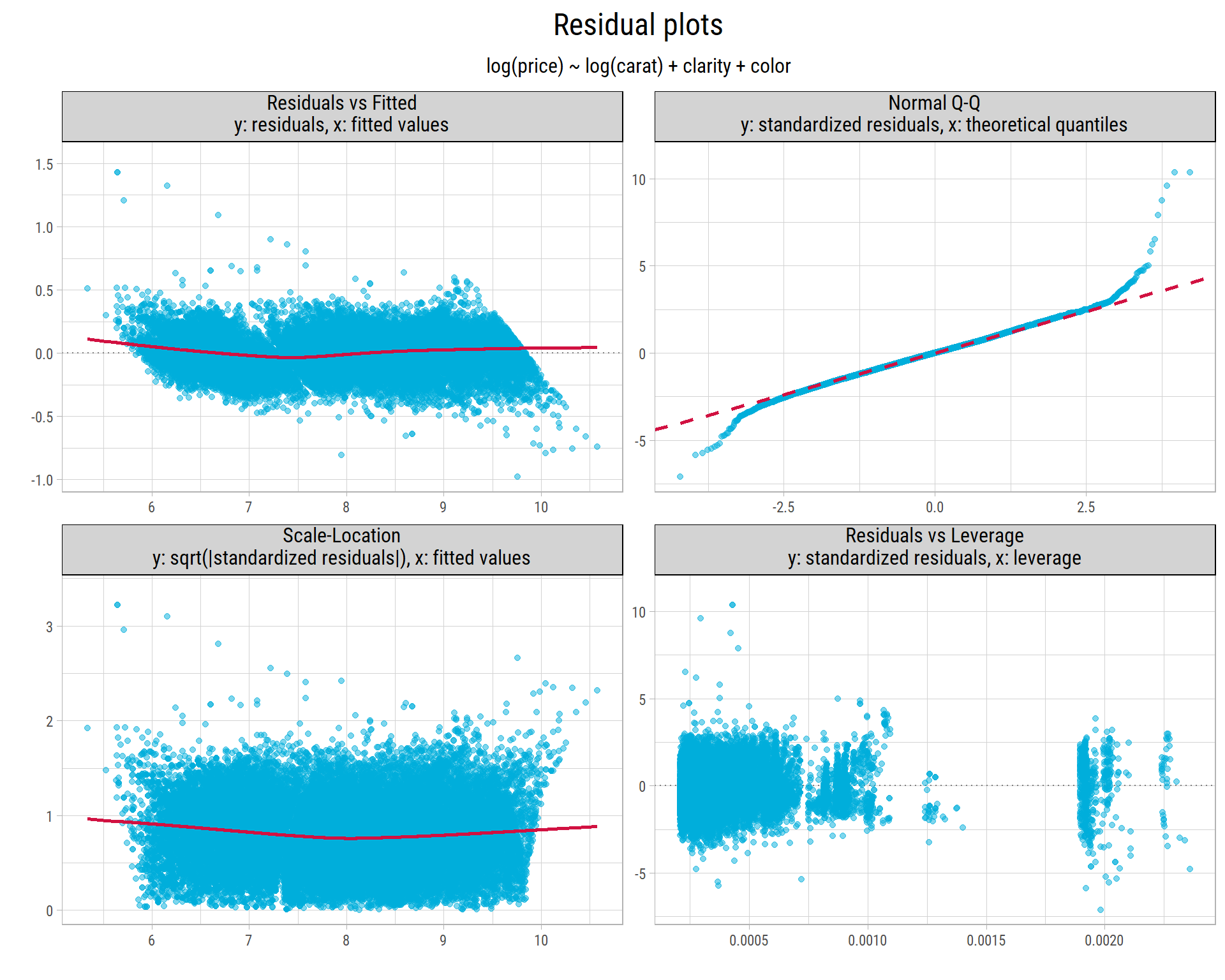
vStdResid <- rstandard(fit_lm[[1]])
vCooks <- cooks.distance(fit_lm[[1]])- Residuals vs Fitted: The residuals stay close to 0 for all predicted values, and the red smooth line is almost flat. So the model captures the relationship well. The small curve shows that a little non-linearity remains. At the highest predicted values, the residuals form a sloping edge below 0. The reason is that no diamond in the data costs more than $18,823, so for the largest predictions, the actual price can only be lower.
- Normal Q-Q: In the middle, the points follow the dashed line, so most residuals are normally distributed. But the tails, especially the upper tail, are longer: some diamonds cost much more than the model predicts. 160 of the 40453 diamonds in the training set have a standardized residual larger than 3, or smaller than -3.
- Scale-Location: The smooth line is almost flat, so the spread of the errors is about the same for cheap and expensive diamonds. The log of
pricemakes the spread stable. Without it, the errors grow with the price. - Residuals vs Leverage: No diamond has a high leverage. The largest Cook’s distance is only 0.0067. A point needs a Cook’s distance of about 0.5 or more to pull the model strongly, so the plot does not even reach the dashed contours that mark 0.5 and 1. No single diamond controls the model.
If clarity and color do not change, a 1% increase in carat increases the predicted price by about 1.88%.
Here is a scatter plot of the prices that our final model predicts for the testing set, against the actual prices:
fit_lm[[2]] %>%
  rename(price = actual) %>%
  eda_plot_predicted_vs_actual("price", "estimate", nLabel = 0, xLog = T, yLog = T,
                               labelsScale = scales::label_dollar(accuracy = 1)) +
  labs(title = bquote(log(price) ~ log(carat) + clarity + color))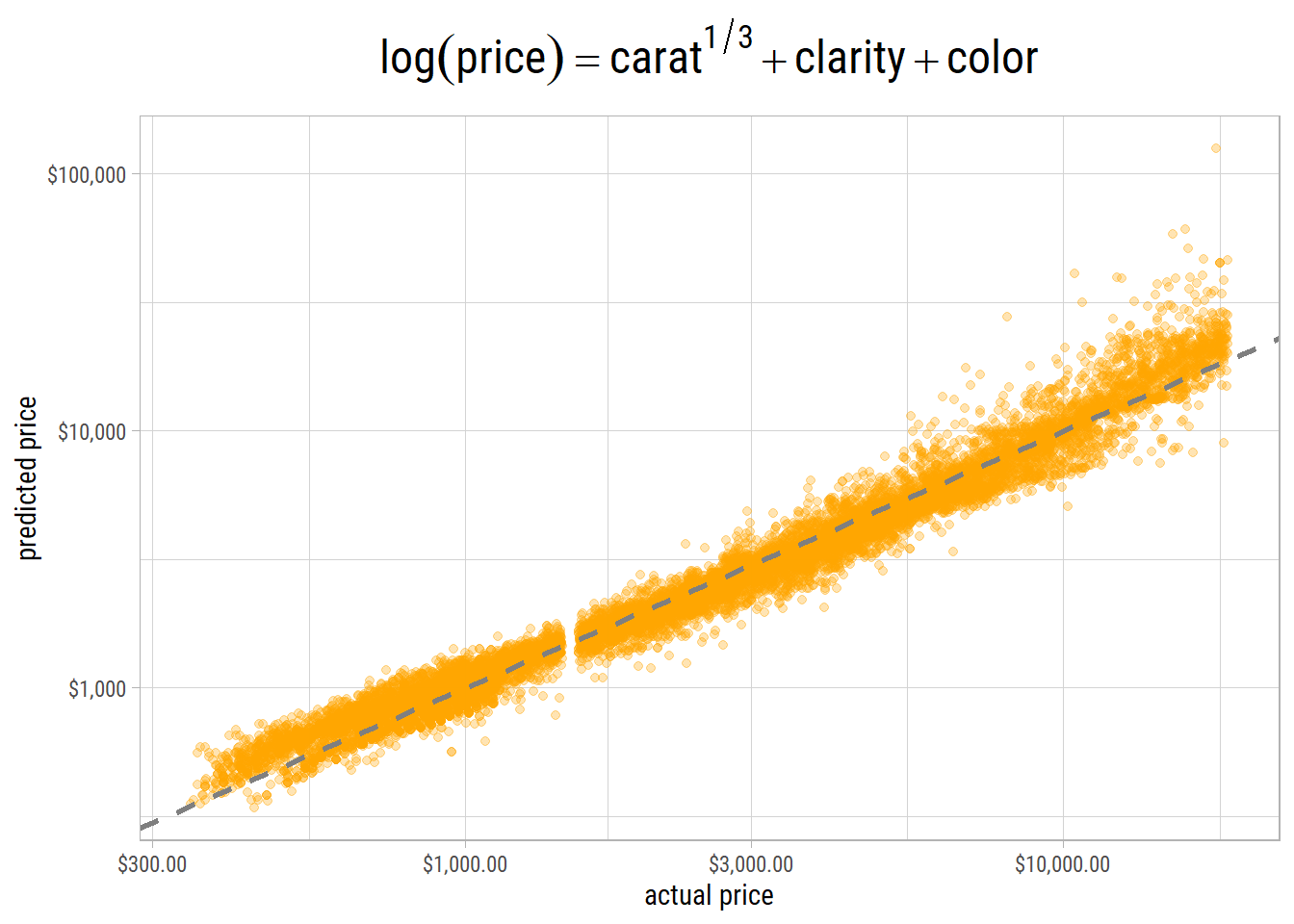
The points are close to the 45-degree line. But at the high end, the differences between the actual and predicted prices become larger.
The predictions of the final model are also much less extreme. The most expensive diamond in the testing set costs $18,804. The highest predicted price is $28,130. But the cube root model predicts prices as high as $59,082 for the same testing set. Like all linear models, the final model can still predict prices above the highest prices in the data (this is called extrapolation).
stopCluster(cl)Next Steps
In Part 3, we build non-linear models (random forests, gradient boosting and neural networks), and we compare them with our final linear model.